Move this message and everything below
Pippin can move every message from a starting message downward: the message you select, and everything after it in that channel, thread, or forum post. Right-click that first message (or open ⋯), then choose Apps → Move, and choose All below when the wizard asks how many messages.
The conversation keeps author names and avatars, attachments, reactions, stickers, and embeds. Only members who were @mentioned in the original message bodies get pinged. Otherwise no one is pinged.
Select the starting message
Scroll to the first message that should move. Right-click it, or open ⋯, then Apps → Move. Pippin treats that message as the anchor. All below includes the anchor and every message after it, up to 200 messages in one run.
In a text channel, the wizard opens in a private setup thread. After a successful move, that thread deletes itself about sixty seconds later. The wizard stays open for 13 minutes.
Choose All below
When Pippin asks how many messages, choose everything below (shown as All below). Pippin previews the last message in the range, with a jump link, so you can check the cut-off before continuing.
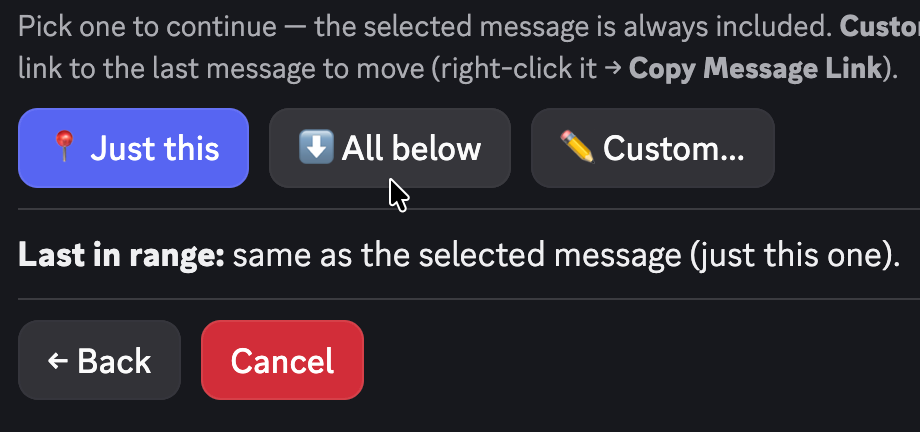
To move a counted slice instead, see Move a range of messages. To move only the anchor, see Move one message.
Pick the destination
Search, or paste a Discord link, for one of these:
- a text or announcement channel
- an existing thread (public, private, or announcement)
- an existing forum post
- a forum channel, which becomes a new forum post
The picker only lists destinations that work. An unsupported link is rejected with an explanation. If the menu cannot show every room, type to search. That is a Discord limit.
Wrap the messages in a new thread
If the destination is a regular channel, Pippin asks whether to wrap the messages into a new thread. Yes (public) and Yes (private) create a thread, name it from the source, and open it with a disclaimer that credits the original author, includes the timestamp, and links back to the source. Pippin copies the auto-archive duration when it recreates a thread. Choosing not to wrap posts the messages flat into the channel.
Choosing a forum channel creates a new forum post. The disclaimer is the starter, and the moved messages follow as replies. Source forum tags are not copied. If the destination forum requires a tag, Pippin applies the first available one. Re-tag the post afterwards if you need a different tag.
Sub-threads
If messages in the range have threads attached, Pippin asks Bring sub-threads along? A move into a regular channel recreates each sub-thread (public stays public, private stays private). A move into a thread or forum post flattens those sub-threads inline, with an attribution note.
Delete the originals or keep them
After the move succeeds, Pippin asks whether to clean up the originals. Delete and Keep are both explicit, and Pippin warns that there is no undo. If you do not answer, the originals stay.
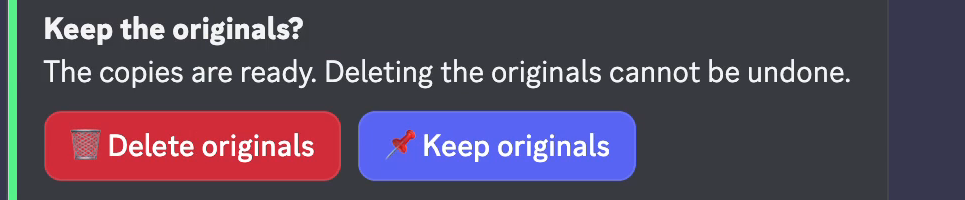
If the whole thread or forum post was moved, Pippin can delete that thread or post. If only part of it moved, Pippin deletes only the messages that moved, and only if you say so.
While Pippin works
The Review move screen shows the message count and the move cost before you confirm. A progress bar with Cancel then runs. Messages already moved stay at the destination. The rest remain in the source.
What is preserved, and what Discord limits
Webhook reposting keeps each author’s server nickname and avatar, in the original order. Attachments are re-uploaded, embeds are copied, and emoji reactions are recreated. Stickers move where Discord allows. If Discord rejects a sticker, that message is reposted without it.
Discord’s reply-link UI is not recreated. Replies arrive as normal messages in order. Pinned status is not carried over. Messages over 2,000 characters, and oversized attachments, ask you to split or drop, skip, or cancel. You can remember that choice for the rest of the move.
A new thread or forum post counts one extra move on top of each message moved. A 40-reply thread is 41 moves for the starter plus the replies, plus one more if Pippin creates a new thread or post.
Limits
One run moves up to 200 messages. Longer stretches take a second run. The free tier includes 300 moves per month plus 1,000 one-time bonus moves. Every feature included. Monthly moves reset at midnight UTC on the 1st. Run /move_status for the plan, monthly usage, and remaining bonus moves. Paid plans are on Plans and pricing. The support server has no monthly move limit. The 200-messages-per-run cap still applies.